---
title: How to optimize delivery to storage
description: Customize Network and Storage settings in the MASV Desktop App to maximize delivery speeds
---
[Skip to content](https://help.massive.io/en/how-to-optimize-delivery-to-storage#main-content)
[](https://massive.io/)
- [Home](https://help.massive.io/en)
- [Products](https://massive.io/product/)
- [Pricing](https://massive.io/pricing/)
- [Blog](https://massive.io/blog/)
- [Company](https://massive.io/about-us/)
Open main navigation
Close main navigation
- [Home](https://help.massive.io/en)
- [Products](https://massive.io/product/)
- [Pricing](https://massive.io/pricing/)
- [Blog](https://massive.io/blog/)
- [Company](https://massive.io/about-us/)
How can we help?
- There are no suggestions because the search field is empty.
1. [Help Center - MASV](https://help.massive.io/en?hsLang=en)
2. [Send and request files](https://help.massive.io/en/send-and-request-files?hsLang=en)
3. [MASV Desktop App](https://help.massive.io/en/send-and-request-files?hsLang=en#masv-desktop-app)
# How to optimize delivery to storage
## Customize Network and Storage settings in the MASV Desktop App to maximize delivery speeds
Not all systems handle file transfers the same way. Factors that affect the speed and efficiency of file transfers with MASV include:
- Network bandwidth: The size of the “pipe” that you use to upload to MASV and download from MASV.
- Type of storage and how it is configured.
- System memory (RAM) available for caching.
The MASV Desktop (and MASV Agent) uses default settings that work well with many environments, but if you’re not hitting the delivery performance you expect, you can fine-tune the settings.
### Network and Storage settings
The following settings are available in the MASV Desktop App:
- **Network presets**: Presets are a great place to start. Read the descriptions carefully to choose one that best matches your system and network capacity (available RAM, network bandwidth…).
- **Max download connections** and **Max upload connections**: Specifies the number of workers feeding data into your network (upload) and receiving data (download). Setting the optimal number of workers maximizes speed by saturating the available bandwidth without causing congestion or exceeding memory requirements (too many workers).
- **Enable memory cache:** Select the checkbox if you have sufficient system memory (RAM) and want to use it to improve transfer to storage performance. Performance success and speed can improve significantly, however, if there is not enough system memory, it will introduce transfer issues. You must restart your system when you change this setting.
- **Storage presets**: We recommend that you start by reviewing the preset descriptions carefully. Choose one that best matches your storage.
- **Max storage readers** and **Max storage writers:** You might need to experiment to determine the optimal number of storage readers and writers. Readers are used for upload and download checksums. Writers are used to write data to storage.
- **Priority:** Determines the priority of read and write actions in the data transfer process and primarily affects download efficiency. The optimal setting will typically be **Mixed reads and writes** or **Prioritize writes** (i.e. the entire package is written before reading checksums).
**Note**: The setting results can vary according to package structure (e.g. a single 1 TB file versus 1000 files that equal 1 TB in total).
For information about optimizing storage and network settings in the MASV Agent, see [Disk Configuration](https://developer.massive.io/transfer-agent/latest/settings/#disk-configuration) and [Network](https://developer.massive.io/transfer-agent/latest/settings/#network) settings in the MASV Developer Documentation.
#### To optimize delivery to storage performance in the MASV Desktop App
1. In the MASV Desktop App, select the menu arrow in the upper right corner, and choose **Settings**.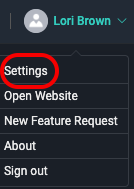
2. In the **Settings** window, select **Speed** from the sidebar on the left.
3. 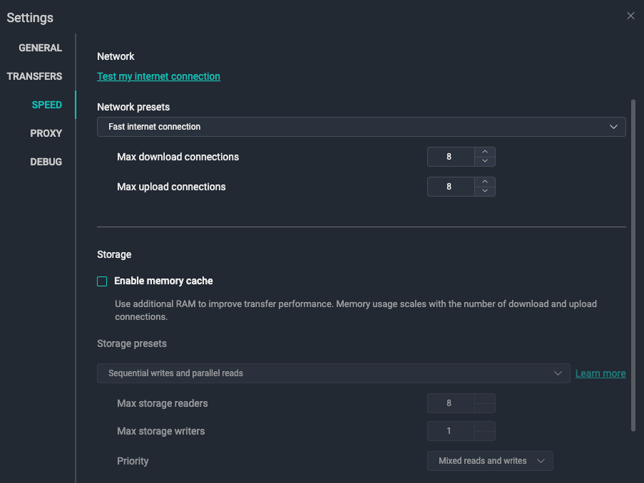In the **Network** area, do one of the following:
1. From the **Network presets** drop-down menu, select a preset that best matches your network and cache capacities.
2. Set custom values in the **Max Download connections** and **Max upload connections** boxes.
4. In the **Storage** area, if you want to use additional RAM to improve performance, select the **Enable memory cache** checkbox. **Note**: You must restart your system when you change this setting.
5. In the **Storage** area, do one of the following:
1. From the **Storage presets** drop-down menu, select a preset that best describes the type of storage you use.
2. Set custom values in the **Max storage readers** and **Mac storage writers** boxes. From the **Priority** drop-down menu, select the option you want.
### Troubleshooting settings that affect delivery speeds
Please review the following list of tips and suggestions to help you optimize your **Network** and **Storage** settings.
- **Avid Nexis**: We recommend the **Sequential reads and writes** preset.
- Generic **input/output errors**: Try applying the **Sequential reads and writes** preset.
- **Issue**: Transfer speed randomly drops to 0 in the middle of the transfer
- Check the **Network preset** and ensure the system has enough available RAM.
- **Issue**: Transfer speed drops to 0 towards the end of the transfer
- This is normal when **Priority** is set to **Prioritize writes**.
- [Get started with MASV](https://help.massive.io/en/get-started-with-masv?hsLang=en)
- [Send and request files](https://help.massive.io/en/send-and-request-files?hsLang=en#main-content)
- [Send files](https://help.massive.io/en/send-and-request-files?hsLang=en#send-files)
- [Request files with portals](https://help.massive.io/en/send-and-request-files?hsLang=en#request-files-with-portals)
- [MASV Desktop App](https://help.massive.io/en/send-and-request-files?hsLang=en#masv-desktop-app)
- [Advanced settings](https://help.massive.io/en/send-and-request-files?hsLang=en#advanced-settings)
- [Apps & Integrations](https://help.massive.io/en/apps-integrations?hsLang=en#main-content)
- [Working with integrations](https://help.massive.io/en/apps-integrations?hsLang=en#working-with-integrations)
- [Cloud integrations](https://help.massive.io/en/apps-integrations?hsLang=en#cloud-integrations)
- [On-premises and cloud storage devices](https://help.massive.io/en/apps-integrations?hsLang=en#on-premises-and-cloud-storage-devices)
- [Asset management & collaboration](https://help.massive.io/en/apps-integrations?hsLang=en#asset-management-collaboration)
- [Teams and user management](https://help.massive.io/en/teams-and-user-management?hsLang=en#main-content)
- [Teams](https://help.massive.io/en/teams-and-user-management?hsLang=en#teams)
- [Roles & Teamspaces](https://help.massive.io/en/teams-and-user-management?hsLang=en#roles-teamspaces)
- [Single Sign-On (SSO)](https://help.massive.io/en/teams-and-user-management?hsLang=en#single-sign-on-sso)
- [Manage file transfers](https://help.massive.io/en/manage-file-transfers?hsLang=en#main-content)
- [Transfer History & Dashboard](https://help.massive.io/en/manage-file-transfers?hsLang=en#transfer-history-dashboard)
- [Notifications](https://help.massive.io/en/manage-file-transfers?hsLang=en#notifications)
- [Custom Metadata](https://help.massive.io/en/manage-file-transfers?hsLang=en#custom-metadata)
- [Account and billing](https://help.massive.io/en/account-and-billing?hsLang=en#main-content)
- [Account](https://help.massive.io/en/account-and-billing?hsLang=en#account)
- [Billing](https://help.massive.io/en/account-and-billing?hsLang=en#billing)
- [Extended Storage](https://help.massive.io/en/account-and-billing?hsLang=en#extended-storage)
- [FAQs](https://help.massive.io/en/faqs?hsLang=en)
- [Releases](https://help.massive.io/en/releases?hsLang=en)
- [MASV Desktop App](https://help.massive.io/en/masv-desktop-app?hsLang=en)
[](https://massive.io)
#### MASV Help Center
**[MASV Service Status](https://masv.statuspage.io/)**
Copyright © 2026, MASV