---
title: Why can't I download the MASV Studio update?
description: Install from our download link to get the latest and greatest version of MASV Studio for Windows
---
[Skip to content](https://help.massive.io/en/why-cant-i-download-the-masv-studio-update#main-content)
[](https://massive.io/)
- [Home](https://help.massive.io/en)
- [Products](https://massive.io/product/)
- [Pricing](https://massive.io/pricing/)
- [Blog](https://massive.io/blog/)
- [Company](https://massive.io/about-us/)
Open main navigation
Close main navigation
- [Home](https://help.massive.io/en)
- [Products](https://massive.io/product/)
- [Pricing](https://massive.io/pricing/)
- [Blog](https://massive.io/blog/)
- [Company](https://massive.io/about-us/)
How can we help?
- There are no suggestions because the search field is empty.
1. [Help Center - MASV](https://help.massive.io/en?hsLang=en)
2. [FAQs](https://help.massive.io/en/faqs?hsLang=en)
# Why can't I download the MASV Studio update?
## Install from our download link to get the latest and greatest version of MASV Studio for Windows
If you’re on a Windows system and unable to install the update from the MASV Studio (formerly MASV Desktop App) auto-update due to the error below, please use the following link to install the latest version of the application:
[MASV Desktop App for Windows](https://massive.io/desktop-app/)
Version: 2.10.0
**Important**: To receive future updates, Windows users must install this version of MASV Studio.
Reinstalling is quick – simply make sure your current version is closed, then install the new version. No need to uninstall the previous version and it doesn’t affect your Transfer History, automations, or settings.
Error message:
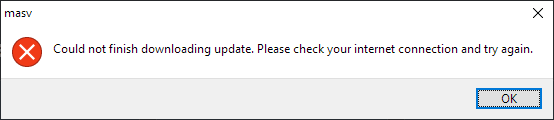
*Could not finish downloading update. Please check your internet connection and try again.*
### Why do I need to reinstall rather than run the update?
We’ve upgraded our security, implementing a new application certificate that requires Windows users to reinstall. The new certificate is in compliance with the latest [Cloud Signature Consortium](https://cloudsignatureconsortium.org/) standards. Future updates will not require you to reinstall.
### What new features are included in the latest version of MASV Studio?
You can find all the new, improved, and fixed items for the latest version in the[Release Notes](https://help.massive.io/en/release-notes?hsLang=en).
- [Get started with MASV](https://help.massive.io/en/get-started-with-masv?hsLang=en)
- [Send and request files](https://help.massive.io/en/send-and-request-files?hsLang=en#main-content)
- [Send files](https://help.massive.io/en/send-and-request-files?hsLang=en#send-files)
- [Request files with portals](https://help.massive.io/en/send-and-request-files?hsLang=en#request-files-with-portals)
- [MASV Studio](https://help.massive.io/en/send-and-request-files?hsLang=en#masv-studio)
- [Advanced settings](https://help.massive.io/en/send-and-request-files?hsLang=en#advanced-settings)
- [Apps & Integrations](https://help.massive.io/en/apps-integrations?hsLang=en#main-content)
- [Working with integrations](https://help.massive.io/en/apps-integrations?hsLang=en#working-with-integrations)
- [Cloud integrations](https://help.massive.io/en/apps-integrations?hsLang=en#cloud-integrations)
- [On-premises and cloud storage devices](https://help.massive.io/en/apps-integrations?hsLang=en#on-premises-and-cloud-storage-devices)
- [Asset management & collaboration](https://help.massive.io/en/apps-integrations?hsLang=en#asset-management-collaboration)
- [Teams and user management](https://help.massive.io/en/teams-and-user-management?hsLang=en#main-content)
- [Teams](https://help.massive.io/en/teams-and-user-management?hsLang=en#teams)
- [Roles & Teamspaces](https://help.massive.io/en/teams-and-user-management?hsLang=en#roles-teamspaces)
- [Single Sign-On (SSO)](https://help.massive.io/en/teams-and-user-management?hsLang=en#single-sign-on-sso)
- [Manage file transfers](https://help.massive.io/en/manage-file-transfers?hsLang=en#main-content)
- [Transfer History & Dashboard](https://help.massive.io/en/manage-file-transfers?hsLang=en#transfer-history-dashboard)
- [Notifications](https://help.massive.io/en/manage-file-transfers?hsLang=en#notifications)
- [Custom Metadata](https://help.massive.io/en/manage-file-transfers?hsLang=en#custom-metadata)
- [Account and billing](https://help.massive.io/en/account-and-billing?hsLang=en#main-content)
- [Account](https://help.massive.io/en/account-and-billing?hsLang=en#account)
- [Billing](https://help.massive.io/en/account-and-billing?hsLang=en#billing)
- [Extended Storage](https://help.massive.io/en/account-and-billing?hsLang=en#extended-storage)
- [FAQs](https://help.massive.io/en/faqs?hsLang=en)
- [Releases](https://help.massive.io/en/releases?hsLang=en)
- [MASV Studio](https://help.massive.io/en/masv-studio?hsLang=en)
[](https://massive.io)
#### MASV Help Center
**[MASV Service Status](https://masv.statuspage.io/)**
Copyright © 2026, MASV