---
title: How to send large files to Dropbox with MASV
description: MASV makes it easy to skip the download and send large files directly to your Dropbox. In this article, we show you how to integrate MASV with Dropbox.
---
[Skip to content](https://help.massive.io/en/send-large-files-to-dropbox-with-masv#main-content)
[](https://massive.io/)
- [Home](https://help.massive.io/en)
- [Products](https://massive.io/product/)
- [Pricing](https://massive.io/pricing/)
- [Blog](https://massive.io/blog/)
- [Company](https://massive.io/about-us/)
Open main navigation
Close main navigation
- [Home](https://help.massive.io/en)
- [Products](https://massive.io/product/)
- [Pricing](https://massive.io/pricing/)
- [Blog](https://massive.io/blog/)
- [Company](https://massive.io/about-us/)
How can we help?
- There are no suggestions because the search field is empty.
1. [Help Center - MASV](https://help.massive.io/en?hsLang=en)
2. [Apps & Integrations](https://help.massive.io/en/apps-integrations?hsLang=en)
3. [Cloud integrations](https://help.massive.io/en/apps-integrations?hsLang=en#cloud-integrations)
# How to send large files to Dropbox with MASV
## MASV makes it easy to skip the download and send large files directly to your Dropbox.
[](https://massive.io/integrations/dropbox/)
[MASV](https://massive.io/) makes it easy to deliver large files to Dropbox cloud storage. MASV transfer recipients can now select Dropbox on the download page, avoiding downloading packages locally and re-uploading them to Dropbox.
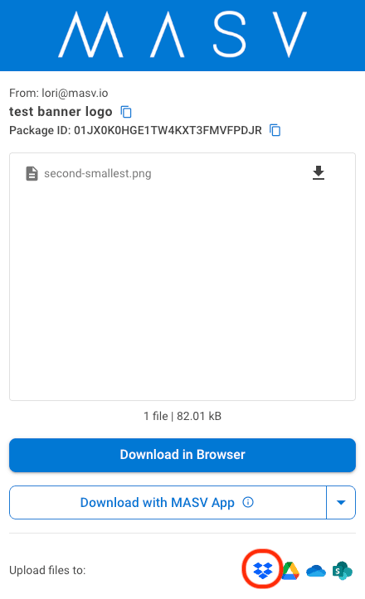
#### To upload files directly to Dropbox from a MASV download page
1. Click the MASV download link you received via email, Slack, or other messaging service.
2. At the bottom of the MASV download page, select the **Dropbox** icon.
3. If you do not already have an integration with Dropbox, you will be asked to enter your Dropbox account credentials.
4. After your authentication is confirmed, your download will begin. Files are saved to your Dropbox **Apps** folder.
**Tip**: For more information about Dropbox integrations with MASV, see [How to connect MASV to Dropbox](https://help.massive.io/en/how-to-connect-to-dropbox?hsLang=en).
**Warning**:
- **Individual uploads to Dropbox cannot exceed 375 GB in size**. If you need to deliver packages greater than 375 GB, break these into multiple packages, then send separately.
- **Pop-up blockers can affect the authentication process**. If authentication does not work as expected, please first check on your browser's pop-up blocker settings and allow or prompt/allow Dropbox.
- [Get started with MASV](https://help.massive.io/en/get-started-with-masv?hsLang=en)
- [Send and request files](https://help.massive.io/en/send-and-request-files?hsLang=en#main-content)
- [Send files](https://help.massive.io/en/send-and-request-files?hsLang=en#send-files)
- [Request files with portals](https://help.massive.io/en/send-and-request-files?hsLang=en#request-files-with-portals)
- [MASV Studio](https://help.massive.io/en/send-and-request-files?hsLang=en#masv-studio)
- [Advanced settings](https://help.massive.io/en/send-and-request-files?hsLang=en#advanced-settings)
- [Apps & Integrations](https://help.massive.io/en/apps-integrations?hsLang=en#main-content)
- [Working with integrations](https://help.massive.io/en/apps-integrations?hsLang=en#working-with-integrations)
- [Cloud integrations](https://help.massive.io/en/apps-integrations?hsLang=en#cloud-integrations)
- [On-premises and cloud storage devices](https://help.massive.io/en/apps-integrations?hsLang=en#on-premises-and-cloud-storage-devices)
- [Asset management & collaboration](https://help.massive.io/en/apps-integrations?hsLang=en#asset-management-collaboration)
- [Teams and user management](https://help.massive.io/en/teams-and-user-management?hsLang=en#main-content)
- [Teams](https://help.massive.io/en/teams-and-user-management?hsLang=en#teams)
- [Roles & Teamspaces](https://help.massive.io/en/teams-and-user-management?hsLang=en#roles-teamspaces)
- [Single Sign-On (SSO)](https://help.massive.io/en/teams-and-user-management?hsLang=en#single-sign-on-sso)
- [Manage file transfers](https://help.massive.io/en/manage-file-transfers?hsLang=en#main-content)
- [Transfer History & Dashboard](https://help.massive.io/en/manage-file-transfers?hsLang=en#transfer-history-dashboard)
- [Notifications](https://help.massive.io/en/manage-file-transfers?hsLang=en#notifications)
- [Custom Metadata](https://help.massive.io/en/manage-file-transfers?hsLang=en#custom-metadata)
- [Account and billing](https://help.massive.io/en/account-and-billing?hsLang=en#main-content)
- [Account](https://help.massive.io/en/account-and-billing?hsLang=en#account)
- [Billing](https://help.massive.io/en/account-and-billing?hsLang=en#billing)
- [Extended Storage](https://help.massive.io/en/account-and-billing?hsLang=en#extended-storage)
- [FAQs](https://help.massive.io/en/faqs?hsLang=en)
- [Releases](https://help.massive.io/en/releases?hsLang=en)
- [MASV Studio](https://help.massive.io/en/masv-studio?hsLang=en)
[](https://massive.io)
#### MASV Help Center
**[MASV Service Status](https://masv.statuspage.io/)**
Copyright © 2026, MASV