---
title: MASV Express
description: MASV Express provides faster file transfer acceleration for business and enterprise.
---
[Skip to content](https://help.massive.io/en/masv-express#main-content)
[](https://massive.io/)
- [Home](https://help.massive.io/en)
- [Products](https://massive.io/product/)
- [Pricing](https://massive.io/pricing/)
- [Blog](https://massive.io/blog/)
- [Company](https://massive.io/about-us/)
Open main navigation
Close main navigation
- [Home](https://help.massive.io/en)
- [Products](https://massive.io/product/)
- [Pricing](https://massive.io/pricing/)
- [Blog](https://massive.io/blog/)
- [Company](https://massive.io/about-us/)
How can we help?
- There are no suggestions because the search field is empty.
1. [Help Center - MASV](https://help.massive.io/en?hsLang=en)
2. [Send and request files](https://help.massive.io/en/send-and-request-files?hsLang=en)
3. [Advanced settings](https://help.massive.io/en/send-and-request-files?hsLang=en#advanced-settings)
# MASV Express
## Faster file transfer acceleration for business and enterprise
MASV Express is exciting new file transfer acceleration technology. Breaking news? Sports coverage? Broadcasting? For any workflow where every moment counts, MASV Express gets files there faster. MASV Express enables the transfer to the destination to start *while the upload is still in progress*, providing near real-time availability of files upon upload completion.
This page includes the following topics:
- [What's the benefit?](https://help.massive.io/en/masv-express#benefit)
- [How much faster is MASV Express?](https://help.massive.io/en/masv-express#speed)
- [Requirements](https://help.massive.io/en/masv-express#requirements)
- [Identifying MASV Express transfers](https://help.massive.io/en/masv-express#identify)
- [MASV virus and malware scanning with MASV Express](https://help.massive.io/en/masv-express#virus-scan)
- [MASV Express troubleshooting checklist](https://help.massive.io/en/masv-express#troubleshooting)
### **What's the benefit?**
Aside from all the current benefits of MASV Standard file acceleration and the MASV Cloud, MASV Express also provides:
- Faster transfers—from the time the upload is complete to the time the files are available on your storage device.
- Access to individual files as they arrive. For multi-file deliveries, you no longer need to wait for the entire package.
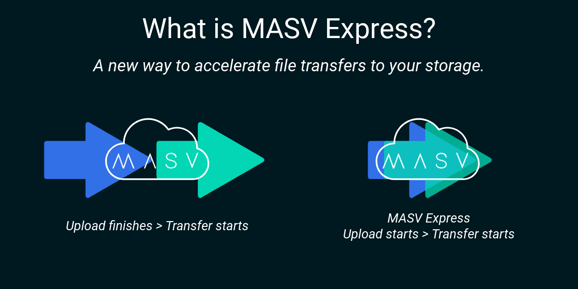
*MASV Express allows the transfer to the destination to start while the upload is still in progress, providing near real-time availability of the files after the upload is complete.*
### How much faster is MASV Express?
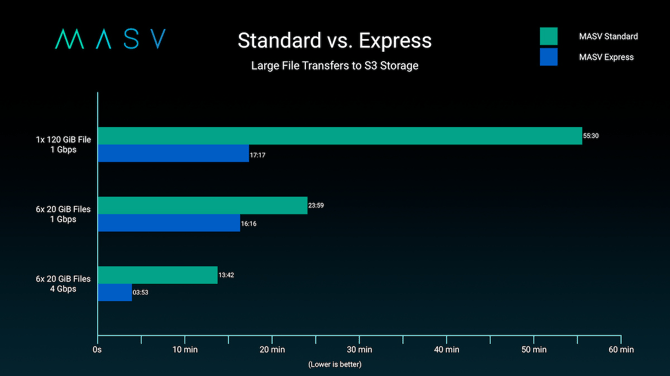
The speed advantage varies depending on the systems, network, and package content. MASV Express is always faster than our MASV Standard file transfer acceleration. The example below shows some factors that can affect speed.
### Requirements
- MASV Express is available for qualifying subscription and Enterprise accounts. Please contact [support@masv.io](mailto:support@masv.io) for information about activation.
- Eligible integrations/destinations:
- **Amazon S3**
- **Wasabi**
- **Amazon EBS/EFS**
- **Desktop Mounted Storage**
- **DigitalOcean**
- **IBM Cloud Object Storage**
- **Jellyfish**
- **MinIO**
- **OpenDrives**
- **QNAP**
- **Synology**
- **Other Storage Device:** On-premises storage such as NAS (network-attached storage) and SAN (storage area network) devices, as well as cloud block storage.
- The following version of the [MASV Studio/MASV Desktop App](https://massive.io/product/desktop-app/) support MASV Express:
- **MASV Studio/MASV Desktop App**: v2.11.0 or later
- **MASV Studio Beta/MASV Desktop Beta App:** v2.11.99 or later
- If using the **MASV Engine/MASV Agent**, please install the [latest version (3.2.0 or higher)](https://developer.massive.io/transfer-agent/latest/).
**Important**: FIFO mode is not supported with MASV Express.
**Note**: MASV Standard is used for any portals that mix MASV Express supported integrations with unsupported integrations.
### Identifying MASV Express transfers in MASV Studio
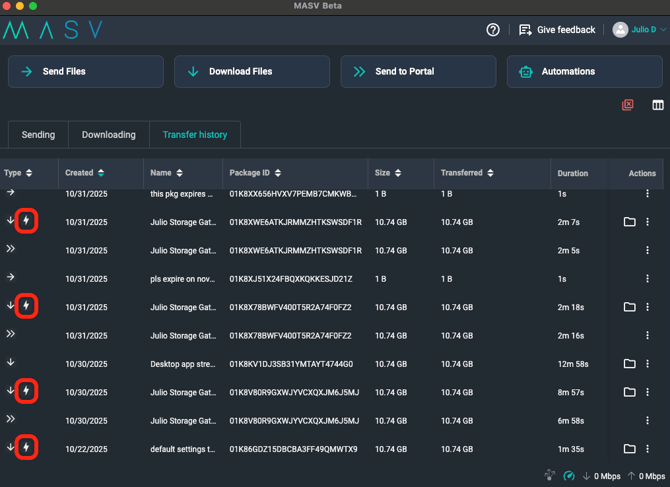
If you're using the MASV Studio with a [Desktop Mounted Storage](https://help.massive.io/en/how-to-connect-desktop-mounted-storage?hsLang=en) connection, you can identify MASV Express deliveries by a lightning bolt icon in the **Type** column.
### MASV virus and malware scanning with MASV Express
Like other cloud and file transfer services, MASV has an individual file size limit for malware scanning (currently 100 MB). To maximize security and performance, follow best practices and ensure the files you plan to send are scanned with local malware protection software and scan your downloads as well. MASV Express carries out the same malware scanning as before, but file delivery speed can exceed scanning and reporting speed, so please follow best practices.
### MASV Express troubleshooting checklist
If you have confirmed that your account has MASV Express turned on, but you aren't receiving per-file delivery of multi-file packages or are experiencing download delays after you've confirmed that an upload is complete, you can use the following checklist to troubleshoot.
- If using automations or delivering to a storage device, do you have the latest version of MASV Studio or the MASV Engine installed? See [Requirements](https://help.massive.io/en/masv-express#requirements).
- Are you using a portal that delivers to multiple integrations? If so, do all the active integrations for the portal support MASV Express? If other integrations are active, the transfer will use MASV Standard instead of MASV Express.
- Are you delivering to a device that has FIFO mode enabled? FIFO is not supported.
If you still need assistance after reviewing the checklist, please contact [support@masv.io](mailto:support@masv.io).
- [Get started with MASV](https://help.massive.io/en/get-started-with-masv?hsLang=en)
- [Send and request files](https://help.massive.io/en/send-and-request-files?hsLang=en#main-content)
- [Send files](https://help.massive.io/en/send-and-request-files?hsLang=en#send-files)
- [Request files with portals](https://help.massive.io/en/send-and-request-files?hsLang=en#request-files-with-portals)
- [MASV Studio](https://help.massive.io/en/send-and-request-files?hsLang=en#masv-studio)
- [Advanced settings](https://help.massive.io/en/send-and-request-files?hsLang=en#advanced-settings)
- [Apps & Integrations](https://help.massive.io/en/apps-integrations?hsLang=en#main-content)
- [Working with integrations](https://help.massive.io/en/apps-integrations?hsLang=en#working-with-integrations)
- [Cloud integrations](https://help.massive.io/en/apps-integrations?hsLang=en#cloud-integrations)
- [On-premises and cloud storage devices](https://help.massive.io/en/apps-integrations?hsLang=en#on-premises-and-cloud-storage-devices)
- [Asset management & collaboration](https://help.massive.io/en/apps-integrations?hsLang=en#asset-management-collaboration)
- [Teams and user management](https://help.massive.io/en/teams-and-user-management?hsLang=en#main-content)
- [Teams](https://help.massive.io/en/teams-and-user-management?hsLang=en#teams)
- [Roles & Teamspaces](https://help.massive.io/en/teams-and-user-management?hsLang=en#roles-teamspaces)
- [Single Sign-On (SSO)](https://help.massive.io/en/teams-and-user-management?hsLang=en#single-sign-on-sso)
- [Manage file transfers](https://help.massive.io/en/manage-file-transfers?hsLang=en#main-content)
- [Transfer History & Dashboard](https://help.massive.io/en/manage-file-transfers?hsLang=en#transfer-history-dashboard)
- [Notifications](https://help.massive.io/en/manage-file-transfers?hsLang=en#notifications)
- [Custom Metadata](https://help.massive.io/en/manage-file-transfers?hsLang=en#custom-metadata)
- [Account and billing](https://help.massive.io/en/account-and-billing?hsLang=en#main-content)
- [Account](https://help.massive.io/en/account-and-billing?hsLang=en#account)
- [Billing](https://help.massive.io/en/account-and-billing?hsLang=en#billing)
- [Extended Storage](https://help.massive.io/en/account-and-billing?hsLang=en#extended-storage)
- [FAQs](https://help.massive.io/en/faqs?hsLang=en)
- [Releases](https://help.massive.io/en/releases?hsLang=en)
- [MASV Studio](https://help.massive.io/en/masv-studio?hsLang=en)
[](https://massive.io)
#### MASV Help Center
**[MASV Service Status](https://masv.statuspage.io/)**
Copyright © 2026, MASV