
Note: These instructions are for the following Beta and Standard versions:
-
MASV Desktop Beta App v2.11.99
-
MASV Desktop App (Standard) version 2.11.0 (macOS and Windows)
If you have been using the MASV Desktop Beta App in order to take advantage of the latest features, you have the option to move to the MASV Desktop App (Standard version) when it makes the new features available. Please visit the Releases page for detailed release notes.
What you need to know
Moving from the Beta version to the Standard version of the MASV Desktop App impacts the following:
- Transfer History (database): Not imported. Packages continue to be trackable from the MASV Web App, but the Transfer History in the MASV Desktop App starts with a clean slate.
- Automations: Not imported. Set up the automations you need in the new version of the MASV Desktop App.
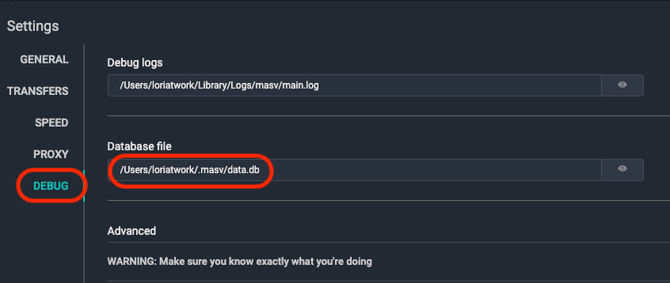
- Settings: You can import settings, such as any scheduling or storage optimizations. Instructions are provided below. To find the location of the settings.yml file, with the Desktop App open, select Settings from the menu, and Debug from the sidebar. The settings.yml file is stored in the same location listed for the Database file (.masvbeta/settings.yml for the Beta; .masv/settings.yml for the Standard version).
To update from MASV Desktop Beta App to MASV Desktop App (Standard)
- Install and run the latest version of the MASV Desktop App.
- Quit the MASV Desktop App.
- Quit the MASV Desktop Beta App (if open).
- Copy your settings.yml file from .masvbeta to .masv. *Location information is detailed in the previous section.
- Open the MASV Desktop App. Check to ensure your settings are as expected.
- When you have finished setting up the Standard version, you can uninstall the MASV Desktop Beta App.
Warning: Avoid any duplicate transfers by ensuring that you have uninstalled the Beta version before enabling any automations in the Standard version of the Desktop App.