
MASV can create manifest and sidecar files for transfers to Amazon S3 and S3-compatible storage. MASV manifest and sidecar files include information such as metadata (including metadata in Custom Forms), file information, and destination path. Destination systems can read manifest and sidecar files and trigger operations on the incoming files.
This page includes the following topics:
- Overview
- Example metadata form, manifest and sidecar files
- MASV schema
- Integrations that support manifest and sidecar files
- Generating manifest and sidecar files in MASV
Overview
MASV can generate the following types of files to pass metadata and other file information:
- Transfer Manifest: A single manifest file that is generated after the package download is complete. It includes a file list with information about each file in the package. If you are transferring a package via a MASV Portal that has more than one integration (i.e. delivering to multiple destinations), a dedicated transfer manifest is generated for each destination, capturing the corresponding file path.
- Per-File Manifest: A sidecar file that is generated for each file in the package. This is particularly beneficial if you are using MASV Express because Per-File Manifest files are generated after each individual file finishes downloading. For large multi-file transfers, this means that there is no need to wait for the entire package to finish downloading before downstream operations can start. You have a choice of saving these JSON files with a .json affix (default) or a .masv affix. The .masv affix makes it easy to identify MASV JSON files in situations where you have JSON files from other sources and want to trigger an action or event using the information in the MASV JSON files only (such as a Lambda function).
Example metadata form, manifest and sidecar files
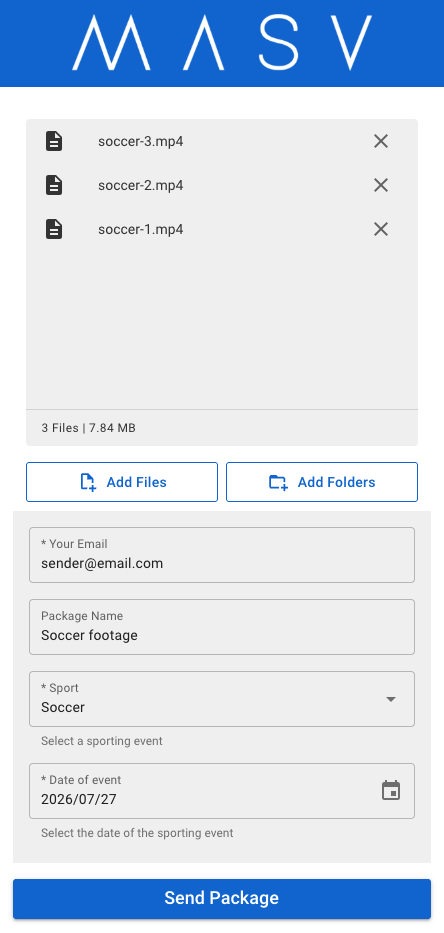
The example portal page below collects the following metadata:
| Field Display Label | Field Name | Type | Required? | Options |
| Your Email | sender_email | sender_email | True (Yes) | (Not applicable) |
| Package Name | package_name | package_name | False (No) | (Not applicable) |
| Sport | sport | dropdown | True (Yes) | Baseball, Soccer, Hockey, Tennis |
| Date of event | date_4 | date | True (Yes) | (Not applicable) |
Transfer Manifest example for the portal package:
{
  "id": "01KYJH83CMR1GA77ZDYRQWERTY",
  "created_at": "2026-07-27T19:38:04.720049743Z",
  "updated_at": "2026-07-27T19:38:05.161303923Z",
  "package": {
    "id": "01KYJH80FDVJDX5ARV801C3P0",
    "files": [
      {
        "id": "01KYJH81JY6M56M68FCN0U812A",
        "kind": "regular",
        "name": "soccer-1.mp4",
        "path": "project-a/Soccer footage",
        "size": 2540121
      },
      {
        "id": "01KYJH8142BTFS6KQ3YJ0U812B",
        "kind": "regular",
        "name": "soccer-2.mp4",
        "path": "project-a/Soccer footage",
        "size": 3171437
      },
      {
        "id": "01KYJH80RSXPJED238QP0U812C",
        "kind": "regular",
        "name": "soccer-3.mp4",
        "path": "project-a/Soccer footage",
        "size": 2512462
      },
      {
        "id": "01KYJH82Y52WDSY3D2A50U812D",
        "kind": "regular",
        "name": "Soccer footage-metadata.json",
        "path": "project-a/Soccer footage",
        "size": 119
      }
    ],
    "name": "Soccer footage",
    "portal_id": "01KT4ED4SKH8AXYFPSVDQWERTO",
    "portal_name": "Jane's portal",
    "sender": "jane@masv.io",
    "size": 8224139,
    "state": "finalized",
    "total_files": 4,
    "metadata": {
      "date_4": "2026/07/27",
      "package_name": "Soccer footage",
      "sender_email": "jane@masv.io",
      "sport": "Soccer"
    },
    "schema": {
      "date_4": {
        "type": "date",
        "required": true
      },
      "package_name": {
        "type": "package_name",
        "required": false
      },
      "sender_email": {
        "type": "sender_email",
        "required": true
      },
      "sport": {
        "type": "dropdown",
        "required": true,
        "options": [
          "Baseball",
          "Hockey",
          "Soccer",
          "Tennis"
        ]
      }
    },
    "created_at": "2026-07-27T19:36:19.693451Z",
    "updated_at": "2026-07-27T19:36:22.163335Z"
  }
}
Per-File Manifest example (one of three produced for the example portal above).
{
  "transfer_id": "01KYJH83CMR1GA77ZDYRQWERTY",
  "package_id": "01KYJH80FDVJDX5ARV801C3P0",
  "file": {
    "id": "01KYJH81JY6M56M68FCN0U812A",
    "name": "soccer-1.mp4",
    "path": "project-a/Soccer footage/soccer-1.mp4",
    "size": 2540121
  },
  "metadata": {
    "date_4": "2026/07/27",
    "package_name": "Soccer footage",
    "sender_email": "jane@masv.io",
    "sport": "Soccer"
  },
  "schema": {
    "date_4": {
      "type": "date",
      "required": true
    },
    "package_name": {
      "type": "package_name",
      "required": false
    },
    "sender_email": {
      "type": "sender_email",
      "required": true
    },
    "sport": {
      "type": "dropdown",
      "required": true,
      "options": [
        "Baseball",
        "Hockey",
        "Soccer",
        "Tennis"
      ]
    }
  }
}
Note: Transfer Manifest files use the kind property to identify if the content is a file or a folder/directory: regular = file, and directory= a folder/directory.
MASV schema
MASV Transfer Manifest and Per-File Manifest files include a schema that helps define the metadata you collect so the information can be properly mapped and ingested into media asset management platforms (MAMs) and pipelines. The schema helps the destination process the metadata accurately (Is the incoming value a string, a number, a date?) without manual intervention.
The schema defines three aspects of the metadata:
- type: When you create a custom form, you choose a field type that determines the format used to collect the metadata. Types include:
- Default fields: sender_email, package_name, package_description (labelled as the "Message" field on portals).
- Custom fields: date, short_text, long_text, number, URL, email
- Custom fields with options: dropdown, radio, checkbox
- required: Captures if the metadata field must be filled in (true) or if it is optional (false). The transfer cannot proceed if a value isn't entered for a required field.
- options: Multiple-choice field types (dropdown, radio, and checkbox) include a preset list of values to choose from; options captures the list of values. In the example above, the Sport dropdown menu includes the following values for the user to choose from: Baseball, Hockey, Soccer, Tennis.
The schema section is always included in the manifest/sidecar file, even if there is no metadata.
Integrations that support manifest and sidecar files
MASV can generate manifest and sidecar files for the following S3-compatible integrations:
|
|
|
Generating manifest and sidecar files in MASV
When you create or edit a manifest-compatible integration with MASV, you can choose to generate a transfer manifest (for the package), a per-file manifest (for each file), or both.
To generate manifest files for packages sent to a MASV integration
- In the MASV Web App, as a Team Owner or Admin (roles), create or edit an S3-compatible integration on the My Integrations page.
- Near the bottom of the Add Integration or Edit Integration window, in the Sidecar Options area, enable one or more of the following options:
- Include Transfer Manifest: Generate a manifest file (JSON) for each package transfer. The manifest includes a full list of files and directories in the package. Available only for S3/S3-compatible integrations.
- Include Per-File Manifest: Generates a manifest file (JSON) for each file delivered. Select the Per-File Manifest Type to set the extension for the files: .json (default) or .masv.
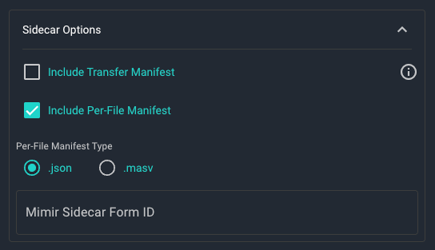
Note: You can include a Per-File Manifest file or a Mimir Sidecar Form ID, but not both.
Tip: You can also set different Sidecar Options settings for each portal that has integrations enabled by choosing the options you want in Portal Integrations Settings. Portal settings override the Sidecar Options set in the Add Integration or Edit Integration window.