---
title: How to change the units of measure in the MASV Desktop App
description: Specify the speed and storage units you want to use—megabits, megabytes, mebibytes...
---
[Skip to content](https://help.massive.io/en/how-to-change-units-of-measure-in-the-masv-desktop-app#main-content)
[](https://massive.io/)
- [Home](https://help.massive.io/en)
- [Products](https://massive.io/product/)
- [Pricing](https://massive.io/pricing/)
- [Blog](https://massive.io/blog/)
- [Company](https://massive.io/about-us/)
Open main navigation
Close main navigation
- [Home](https://help.massive.io/en)
- [Products](https://massive.io/product/)
- [Pricing](https://massive.io/pricing/)
- [Blog](https://massive.io/blog/)
- [Company](https://massive.io/about-us/)
How can we help?
- There are no suggestions because the search field is empty.
1. [Help Center - MASV](https://help.massive.io/en?hsLang=en)
2. [Send and request files](https://help.massive.io/en/send-and-request-files?hsLang=en)
3. [MASV Desktop App](https://help.massive.io/en/send-and-request-files?hsLang=en#masv-desktop-app)
# How to change the units of measure in the MASV Desktop App
## Specify the speed and storage units you want to use–megabits, megabytes, mebibytes...
When it comes to measuring data and data transfer speeds, there are different standards. The MASV Desktop App lets you specify the units of measure that work best for you.
#### To change the units of measure in the MASV Desktop App
1. In the MASV Desktop App, select the menu arrow in the upper right corner, and choose **Settings**.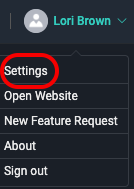
2. In the **Settings** window, select **General** from the sidebar on the left.
3. In the **Speed** units area, select one of the following options:
- **Megabits per second (Mbps)**: Megabits are often used to describe internet speed. 1 Mbps = 1,000,000 bits per second.
- **Megabytes per second (MB/s)**: 8 x Megabits per second. It is often used to describe data transfer speeds. 1 MB/s = 8,000,000 bits per second.
- **Mebibits per second (Mibps)**: 1 Mibps = 2^20 bits per second = 1,048,576 bits per second.
- **Mebibytes per second (MiB/s)**: 1 MiB/s = 8 x Mebibits per second = 8,388,608 bits per second.
4. In the **Storage** units area, select one of the following options:
- **Megabytes (MB):** Industry standard used to measure device storage capacity. Also used to measure file size on macOS. 1 MB = 1,000,000 bytes.
- **Mebibytes (MiB)**: Common unit of measure for file system formats on Windows and Linux. 1 MiB = 1,048,576 bytes.
- [Get started with MASV](https://help.massive.io/en/get-started-with-masv?hsLang=en)
- [Send and request files](https://help.massive.io/en/send-and-request-files?hsLang=en#main-content)
- [Send files](https://help.massive.io/en/send-and-request-files?hsLang=en#send-files)
- [Request files with portals](https://help.massive.io/en/send-and-request-files?hsLang=en#request-files-with-portals)
- [MASV Desktop App](https://help.massive.io/en/send-and-request-files?hsLang=en#masv-desktop-app)
- [Advanced settings](https://help.massive.io/en/send-and-request-files?hsLang=en#advanced-settings)
- [Apps & Integrations](https://help.massive.io/en/apps-integrations?hsLang=en#main-content)
- [Working with integrations](https://help.massive.io/en/apps-integrations?hsLang=en#working-with-integrations)
- [Cloud integrations](https://help.massive.io/en/apps-integrations?hsLang=en#cloud-integrations)
- [On-premises and cloud storage devices](https://help.massive.io/en/apps-integrations?hsLang=en#on-premises-and-cloud-storage-devices)
- [Asset management & collaboration](https://help.massive.io/en/apps-integrations?hsLang=en#asset-management-collaboration)
- [Teams and user management](https://help.massive.io/en/teams-and-user-management?hsLang=en#main-content)
- [Teams](https://help.massive.io/en/teams-and-user-management?hsLang=en#teams)
- [Roles & Teamspaces](https://help.massive.io/en/teams-and-user-management?hsLang=en#roles-teamspaces)
- [Single Sign-On (SSO)](https://help.massive.io/en/teams-and-user-management?hsLang=en#single-sign-on-sso)
- [Manage file transfers](https://help.massive.io/en/manage-file-transfers?hsLang=en#main-content)
- [Transfer History & Dashboard](https://help.massive.io/en/manage-file-transfers?hsLang=en#transfer-history-dashboard)
- [Notifications](https://help.massive.io/en/manage-file-transfers?hsLang=en#notifications)
- [Custom Metadata](https://help.massive.io/en/manage-file-transfers?hsLang=en#custom-metadata)
- [Account and billing](https://help.massive.io/en/account-and-billing?hsLang=en#main-content)
- [Account](https://help.massive.io/en/account-and-billing?hsLang=en#account)
- [Billing](https://help.massive.io/en/account-and-billing?hsLang=en#billing)
- [Extended Storage](https://help.massive.io/en/account-and-billing?hsLang=en#extended-storage)
- [FAQs](https://help.massive.io/en/faqs?hsLang=en)
- [Releases](https://help.massive.io/en/releases?hsLang=en)
- [MASV Desktop App](https://help.massive.io/en/masv-desktop-app?hsLang=en)
[](https://massive.io)
#### MASV Help Center
**[MASV Service Status](https://masv.statuspage.io/)**
Copyright © 2026, MASV