---
title: What products does MASV have?
description: The MASV Ecosystem
---
[Skip to content](https://help.massive.io/en/what-products-does-masv-have#main-content)
[](https://massive.io/)
- [Home](https://help.massive.io/en)
- [Products](https://massive.io/product/)
- [Pricing](https://massive.io/pricing/)
- [Blog](https://massive.io/blog/)
- [Company](https://massive.io/about-us/)
Open main navigation
Close main navigation
- [Home](https://help.massive.io/en)
- [Products](https://massive.io/product/)
- [Pricing](https://massive.io/pricing/)
- [Blog](https://massive.io/blog/)
- [Company](https://massive.io/about-us/)
How can we help?
- There are no suggestions because the search field is empty.
1. [Help Center - MASV](https://help.massive.io/en?hsLang=en)
2. [Get started with MASV](https://help.massive.io/en/get-started-with-masv?hsLang=en)
# What products does MASV have?
## The MASV Ecosystem
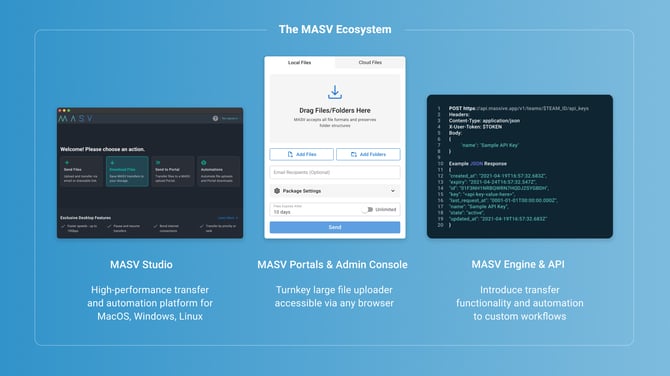
MASV has three main components:
- [MASV Admin Console](https://help.massive.io/en/what-products-does-masv-have#masv-console)
- [MASV Studio](https://help.massive.io/en/what-products-does-masv-have#masv-studio)
- [MASV API](https://help.massive.io/en/what-products-does-masv-have#masv-api), made even simpler by using the **MASV Engine** or **MASV Web SDKs**.
### MASV Admin Console
The MASV Admin Console (formerly MASV Web App) is a browser-based app that combines basic transfer functionality with admin functions. This is where it all starts. Set up an account in less than five minutes and you’re ready to start sending files. For simple, reliable, fast and secure transfers, this might be all you need.
#### **What can you do in the MASV Admin Console?**
- **Send** files and folders – any \*size, any number. Recipients don't need a MASV account.
- Set up MASV **Portals** that let you send and receive files in a trackable, organized way.
- **Collect** files from anyone--no MASV account required for people who send you files via your Portals.
- Integrate MASV with **cloud services** (Amazon Web Services, Google Cloud, Dropbox, Wasabi... )
- Integrate MASV with industry-standard tools like Frame.io, Iconik, MediaSilo, SharePoint...
- Integrate MASV with on-premises storage devices (NAS, SAN, …)
- Manage your profile and your team, review account and app settings, set user access and security options.
- **Dashboard**: Monitor your usage and get detailed billing reports.
*\*Individual file size limit depends on destination.*
### MASV Studio
MASV Studio (formerly MASV Desktop App) is a desktop application that extends what you can do with MASV. It offers additional features that boost performance and automation. Available for Windows, macOS, and Linux.
#### **What can you do in MASV Studio?**
- **Faster** sending and receiving of files—up to 10 Gbps.
- **Automate** sending and receiving files with Watch Folders.
- **Multiconnect** to pool bandwidth from different devices with channel bonding technology – perfect if you’re in the field trying to send files.
- **Manage bandwidth**: Control how much bandwidth is used when, and set priority for bandwidth usage. Pause and resume transfers with checkpoints that resume from where you left off.
- **Persistent** transfers: Automatically resume transfers in the event of a network interruption.
- Transfer integrity verification: **Checksum** ensures that what is sent is exactly what is received.
### MASV Engine and API
You can build MASV directly into your own platform and workflows:
- Start by checking out the **MASV Engine** (formerly MASV Agent), a cross-platform service that makes it easy to optimize transfers to and from cloud and on-prem storage. It runs as a local server with both a CLI and a REST API, handling uploads, downloads, automations, and storage connections without a graphical interface.
- Check out the **MASV Web SDK** for the **MASV Web Uploader** and **MASV Web Downloader** if you're looking for browser-based solutions.
- Create custom solutions with the **MASV API**.
Learn all you need to know about the API, webhooks, and more in the [MASV Developer Documentation](https://developer.masv.io/).
- [Get started with MASV](https://help.massive.io/en/get-started-with-masv?hsLang=en)
- [Send and request files](https://help.massive.io/en/send-and-request-files?hsLang=en#main-content)
- [Send files](https://help.massive.io/en/send-and-request-files?hsLang=en#send-files)
- [Request files with portals](https://help.massive.io/en/send-and-request-files?hsLang=en#request-files-with-portals)
- [MASV Studio](https://help.massive.io/en/send-and-request-files?hsLang=en#masv-studio)
- [Advanced settings](https://help.massive.io/en/send-and-request-files?hsLang=en#advanced-settings)
- [Apps & Integrations](https://help.massive.io/en/apps-integrations?hsLang=en#main-content)
- [Working with integrations](https://help.massive.io/en/apps-integrations?hsLang=en#working-with-integrations)
- [Cloud integrations](https://help.massive.io/en/apps-integrations?hsLang=en#cloud-integrations)
- [On-premises and cloud storage devices](https://help.massive.io/en/apps-integrations?hsLang=en#on-premises-and-cloud-storage-devices)
- [Asset management & collaboration](https://help.massive.io/en/apps-integrations?hsLang=en#asset-management-collaboration)
- [Teams and user management](https://help.massive.io/en/teams-and-user-management?hsLang=en#main-content)
- [Teams](https://help.massive.io/en/teams-and-user-management?hsLang=en#teams)
- [Roles & Teamspaces](https://help.massive.io/en/teams-and-user-management?hsLang=en#roles-teamspaces)
- [Single Sign-On (SSO)](https://help.massive.io/en/teams-and-user-management?hsLang=en#single-sign-on-sso)
- [Manage file transfers](https://help.massive.io/en/manage-file-transfers?hsLang=en#main-content)
- [Transfer History & Dashboard](https://help.massive.io/en/manage-file-transfers?hsLang=en#transfer-history-dashboard)
- [Notifications](https://help.massive.io/en/manage-file-transfers?hsLang=en#notifications)
- [Custom Metadata](https://help.massive.io/en/manage-file-transfers?hsLang=en#custom-metadata)
- [Account and billing](https://help.massive.io/en/account-and-billing?hsLang=en#main-content)
- [Account](https://help.massive.io/en/account-and-billing?hsLang=en#account)
- [Billing](https://help.massive.io/en/account-and-billing?hsLang=en#billing)
- [Extended Storage](https://help.massive.io/en/account-and-billing?hsLang=en#extended-storage)
- [FAQs](https://help.massive.io/en/faqs?hsLang=en)
- [Releases](https://help.massive.io/en/releases?hsLang=en)
- [MASV Studio](https://help.massive.io/en/masv-studio?hsLang=en)
[](https://massive.io)
#### MASV Help Center
**[MASV Service Status](https://masv.statuspage.io/)**
Copyright © 2026, MASV