---
title: How to download packages in the MASV Desktop App
description: In this article, we provide a step-by-step guide on how to download packages through MASV App. Discover more.
---
[Skip to content](https://help.massive.io/en/how-to-download-packages-through-masv-app#main-content)
[](https://massive.io/)
- [Home](https://help.massive.io/en)
- [Products](https://massive.io/product/)
- [Pricing](https://massive.io/pricing/)
- [Blog](https://massive.io/blog/)
- [Company](https://massive.io/about-us/)
Open main navigation
Close main navigation
- [Home](https://help.massive.io/en)
- [Products](https://massive.io/product/)
- [Pricing](https://massive.io/pricing/)
- [Blog](https://massive.io/blog/)
- [Company](https://massive.io/about-us/)
How can we help?
- There are no suggestions because the search field is empty.
1. [Help Center - MASV](https://help.massive.io/en?hsLang=en)
2. [Send and request files](https://help.massive.io/en/send-and-request-files?hsLang=en)
3. [MASV Desktop App](https://help.massive.io/en/send-and-request-files?hsLang=en#masv-desktop-app)
# How to download packages in the MASV Desktop App
## You can download packages in the MASV Desktop App by using the download link
You can download packages in the MASV Desktop App by using the package download link from the download page in your browser or by copying the download link from the MASV Web App **Transfer History** page. The MASV Desktop App offers some additional optimizations that can further accelerate downloads.
#### To download the files in the MASV Desktop App
1. In the MASV Desktop App, select **Download Files**.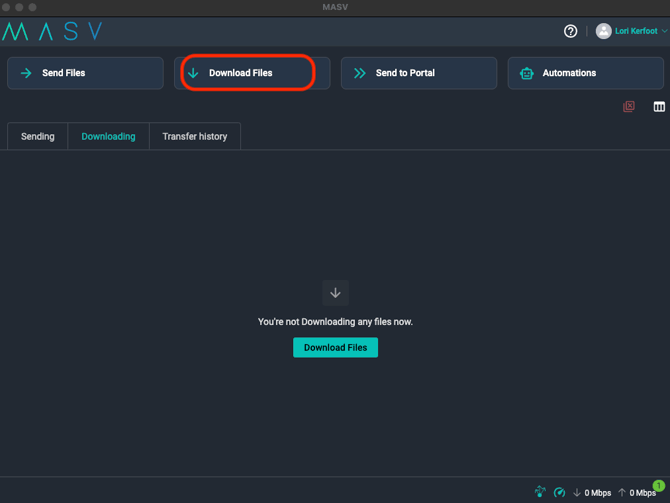
2. In the **Download Files** window, paste the download link (for example, the link from a MASV download page sent via email).
3. (Optional) If the package includes multiple files, select only the files you want to download from the file list.
4. In the **Destination folder** field, enter where the files will be saved. If you don't want the package name to be included in the destination path, select the **Don't create new parent folder** checkbox.
5. (Optional) In the **Priority** box, if you have multiple downloads happening and want to set a priority, select the option you want.
6. Select the **Download** button**.**
Your download will initiate in the app and will be shown on the **Downloading** tab. When the transfer is complete, it displays on the **Transfer history** tab.
**Note**: MASV runs a checksum verification on each package that you download. The **Status** column displays the word **Verifying** when the checksum is running. For more information, see [Checksum in MASV](https://help.massive.io/en/checksum-in-masv?hsLang=en).
**Tip**: All downloads initiated from the browser can be downloaded using MASV Desktop App by selecting the Desktop App as the method of download from the download page in your browser. If the MASV Desktop App is not yet installed, a custom download link is provided which will install the app and start the download.
- [Get started with MASV](https://help.massive.io/en/get-started-with-masv?hsLang=en)
- [Send and request files](https://help.massive.io/en/send-and-request-files?hsLang=en#main-content)
- [Send files](https://help.massive.io/en/send-and-request-files?hsLang=en#send-files)
- [Request files with portals](https://help.massive.io/en/send-and-request-files?hsLang=en#request-files-with-portals)
- [MASV Desktop App](https://help.massive.io/en/send-and-request-files?hsLang=en#masv-desktop-app)
- [Advanced settings](https://help.massive.io/en/send-and-request-files?hsLang=en#advanced-settings)
- [Apps & Integrations](https://help.massive.io/en/apps-integrations?hsLang=en#main-content)
- [Working with integrations](https://help.massive.io/en/apps-integrations?hsLang=en#working-with-integrations)
- [Cloud integrations](https://help.massive.io/en/apps-integrations?hsLang=en#cloud-integrations)
- [On-premises and cloud storage devices](https://help.massive.io/en/apps-integrations?hsLang=en#on-premises-and-cloud-storage-devices)
- [Asset management & collaboration](https://help.massive.io/en/apps-integrations?hsLang=en#asset-management-collaboration)
- [Teams and user management](https://help.massive.io/en/teams-and-user-management?hsLang=en#main-content)
- [Teams](https://help.massive.io/en/teams-and-user-management?hsLang=en#teams)
- [Roles & Teamspaces](https://help.massive.io/en/teams-and-user-management?hsLang=en#roles-teamspaces)
- [Single Sign-On (SSO)](https://help.massive.io/en/teams-and-user-management?hsLang=en#single-sign-on-sso)
- [Manage file transfers](https://help.massive.io/en/manage-file-transfers?hsLang=en#main-content)
- [Transfer History & Dashboard](https://help.massive.io/en/manage-file-transfers?hsLang=en#transfer-history-dashboard)
- [Notifications](https://help.massive.io/en/manage-file-transfers?hsLang=en#notifications)
- [Custom Metadata](https://help.massive.io/en/manage-file-transfers?hsLang=en#custom-metadata)
- [Account and billing](https://help.massive.io/en/account-and-billing?hsLang=en#main-content)
- [Account](https://help.massive.io/en/account-and-billing?hsLang=en#account)
- [Billing](https://help.massive.io/en/account-and-billing?hsLang=en#billing)
- [Extended Storage](https://help.massive.io/en/account-and-billing?hsLang=en#extended-storage)
- [FAQs](https://help.massive.io/en/faqs?hsLang=en)
- [Releases](https://help.massive.io/en/releases?hsLang=en)
- [MASV Desktop App](https://help.massive.io/en/masv-desktop-app?hsLang=en)
[](https://massive.io)
#### MASV Help Center
**[MASV Service Status](https://masv.statuspage.io/)**
Copyright © 2026, MASV